# Ingress controller in AKS #Azure Kubernetes AKS Nginx
AKS It is used to configure reverse proxy, configurable traffic routing, and TLS termination for Kubernetes services. See Webservers for related concepts.
It helps expose routes to public from various different apps hosted within a cluster.
Usage:
- Use a single IP address to route traffic to different services
- For TLS termination
- To perform path or host based traffic routing
Architecture:
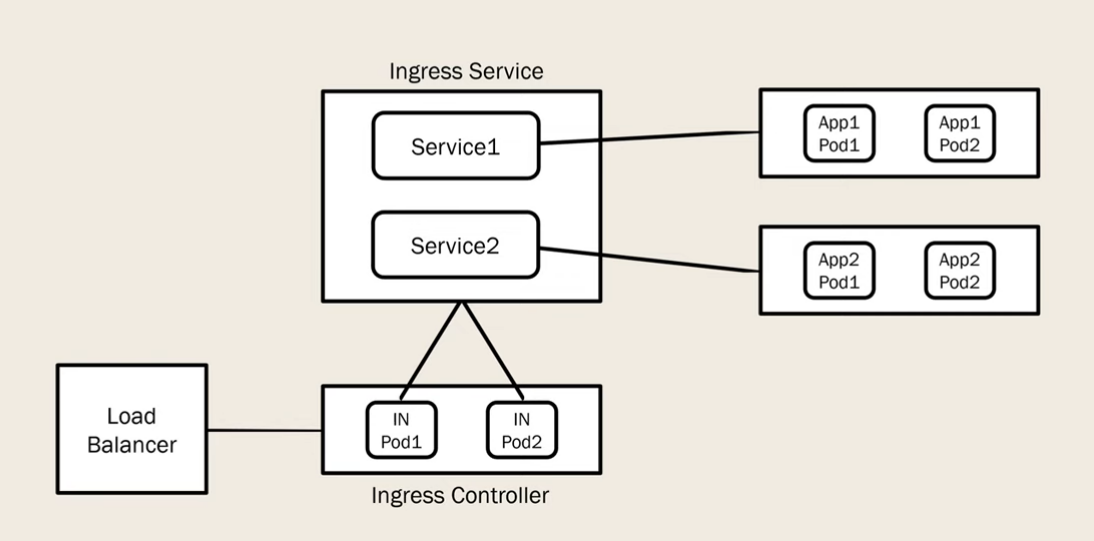
Demo:
A simple demo to show the routing of traffic using a path based routing on the IP address of the loadbalancer.
Requirements:
Tools:
- azcli
- kubectl
- helm
Other:
- A valid azure subscription
- kubectl context set to the cluster
Steps:
- Create two deployment yml files for the demo applications:
cat hw1.yml << EOF

apiVersion: apps/v1
kind: Deployment
metadata:
  name: aks-helloworld-one
spec:
  replicas: 1
  selector:
    matchLabels:
      app: aks-helloworld-one
  template:
    metadata:
      labels:
        app: aks-helloworld-one
    spec:
      containers:
      - name: aks-helloworld-one
        image: mcr.microsoft.com/azuredocs/aks-helloworld:v1
        ports:
        - containerPort: 80
        env:
        - name: TITLE
          value: "Hello world 1"
---
apiVersion: v1
kind: Service
metadata:
  name: aks-helloworld-one
spec:
  type: ClusterIP
  ports:
  - port: 80
  selector:
    app: aks-helloworld-one

EOF
cat hw2.yml << EOF
apiVersion: apps/v1
kind: Deployment
metadata:
name: aks-helloworld-two
spec:
replicas: 1
selector:
matchLabels:
app: aks-helloworld-two
template:
metadata:
labels:
app: aks-helloworld-two
spec:
containers:
- name: aks-helloworld-two
image: mcr.microsoft.com/azuredocs/aks-helloworld:v1
ports:
- containerPort: 80
env:
- name: TITLE
value: "Hello world 2!"
---
apiVersion: v1
kind: Service
metadata:
name: aks-helloworld-two
spec:
type: ClusterIP
ports:
- port: 80
selector:
app: aks-helloworld-two
EOF- Switch to the hello-world namespace and apply the deployments
kubectl create namespace hello-world
kubectl config set-context --current --namespace=hello-world
kubectl create -f hw1.yml
kubectl create -f hw2.yml- Install the nginx-ingress on a seprate namespace using helm
# create a new namespace, and use helm to install ingress
NAMESPACE=ingress-basic

helm repo add ingress-nginx https://kubernetes.github.io/ingress-nginx
helm repo update

helm install ingress-nginx ingress-nginx/ingress-nginx \ --create-namespace \ --namespace $NAMESPACE \ --set controller.service.annotations."service\.beta\.kubernetes\.io/azure-load-balancer-health-probe-request-path"=/healthz- Create a hello world ingress yml file and deploy it
cat hw-ingress.yml << EOF

apiVersion: networking.k8s.io/v1
kind: Ingress
metadata:
  name: hello-world-ingress
  annotations:
    nginx.ingress.kubernetes.io/ssl-redirect: "false"
    nginx.ingress.kubernetes.io/use-regex: "true"
    nginx.ingress.kubernetes.io/rewrite-target: /$2
spec:
  ingressClassName: nginx
  rules:
  - http:
      paths:
      - path: /hello-world-one(/|$)(.*)
        pathType: Prefix
        backend:
          service:
            name: aks-helloworld-one
            port:
              number: 80
      - path: /hello-world-two(/|$)(.*)
        pathType: Prefix
        backend:
          service:
            name: aks-helloworld-two
            port:
              number: 80
      - path: /(.*)
        pathType: Prefix
        backend:
          service:
            name: aks-helloworld-one
            port:
              number: 80
---
apiVersion: networking.k8s.io/v1
kind: Ingress
metadata:
  name: hello-world-ingress-static
  annotations:
    nginx.ingress.kubernetes.io/ssl-redirect: "false"
    nginx.ingress.kubernetes.io/rewrite-target: /static/$2
spec:
  ingressClassName: nginx
  rules:
  - http:
      paths:
      - path: /static(/|$)(.*)
        pathType: Prefix
        backend:
          service:
            name: aks-helloworld-one
            port:
              number: 80

EOF
kubectl create -f hello-world-ingress.yml
Debugging commands:
# To view the running pods:
kubectl get po
kubectl get po --all-namespaces

# To view services:
kubectl get svc
kubectl get svc --all-namespaces

## To view ingress:
kubectl get ingress
kubectl get ingress --all-namespaces

## To view all of these at the same time
kubectl get ingress,po,svc
kubectl get ingress,po,svc --all-namespaces

## To view the current config on kubectl
kubectl view config

## To delete config contexts, users, and clusters
kubectl config unset clusters
kubectl config unset contexts
kubectl config unset users